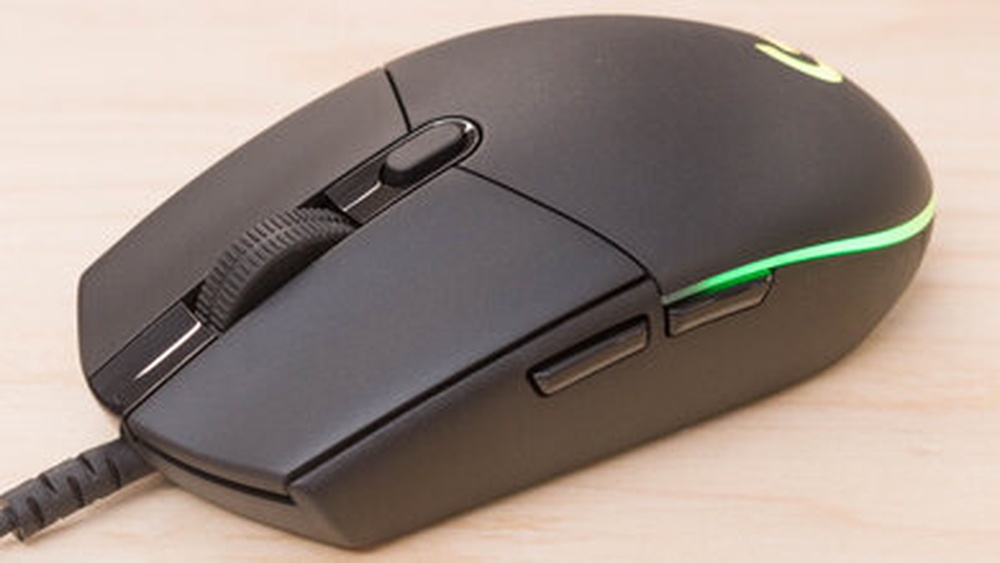
Whether you’re a casual gamer or a competitive esports player, the gaming mouse you use can make or break your performance. A gaming mouse is far more than just a pointing device — it’s a precision instrument engineered for speed, accuracy, and endurance. With the right gaming mouse in hand, you can execute faster flicks, track targets smoothly, and gain a competitive edge that a regular office mouse simply can’t offer.
In this complete buying guide, we’ll walk you through everything you need to know about gaming mice — from sensor types and DPI settings to grip styles and wireless technology. Whether you’re shopping on a tight budget or looking for the ultimate flagship mouse, this guide will help you make the smartest choice in 2026.
What Makes a Gaming Mouse Different?
A gaming mouse differs from a standard office mouse in several key ways. While both serve the same basic purpose of moving a cursor across a screen, gaming mice are built with performance-first priorities:
- High-precision optical or laser sensors — Gaming mice use advanced sensors capable of detecting micro-movements with extreme accuracy.
- Adjustable DPI (Dots Per Inch) — Gamers can tune sensitivity on the fly depending on the game or situation.
- Higher polling rates — Gaming mice typically report their position to the computer 1000 times per second (1000Hz), compared to 125Hz for regular mice.
- Ergonomic and grip-optimized designs — Built for extended sessions without fatigue.
- Programmable buttons — Extra buttons for macros, abilities, and in-game actions.
- Durable switches — Rated for 20-100 million clicks to ensure longevity.
- Customizable RGB lighting — Aesthetic appeal for gaming setups.
In short, a gaming mouse is engineered from the ground up to meet the demands of fast-paced, precision-critical gaming environments.
Key Features to Look For in a Gaming Mouse
Before buying a gaming mouse, you need to understand the specs and features that truly matter. Here’s a breakdown:
1. DPI (Dots Per Inch)
DPI measures how far your cursor moves relative to physical mouse movement. A higher DPI means the cursor moves farther with less physical movement. Most gaming mice offer DPI ranges from 200 to 25,600+. However, more DPI isn’t always better — most professional gamers use between 400 and 1600 DPI for optimal precision. Look for a mouse with adjustable DPI settings so you can customize it to your preferences.
2. Polling Rate
The polling rate (measured in Hz) determines how often the mouse sends position data to your computer. A 1000Hz polling rate means the mouse updates 1000 times per second, resulting in a 1ms response time. Higher polling rates (4000Hz, 8000Hz) are now available on premium gaming mice, offering even smoother tracking. For most gamers, 1000Hz is more than sufficient.
3. Sensor Type
There are two types of sensors in gaming mice:
- Optical Sensors: Use an LED or infrared light to track movement. They are more accurate and work on most surfaces. Modern optical sensors are highly recommended for competitive gaming.
- Laser Sensors: Use a laser beam for tracking and can work on more surface types including glass. However, they can be prone to acceleration issues at high speeds.
For FPS and competitive gaming, optical sensors (like PixArt 3395 or Logitech HERO) are generally preferred.
4. Number of Buttons
Standard gaming mice have at least 5-7 buttons (left click, right click, scroll wheel click, and two side buttons). MMO gaming mice can feature 12+ programmable buttons for binding spells and macros. Choose based on your game genre — FPS players rarely need many buttons, while MOBA and MMO players benefit from more.
5. Grip Style Compatibility
Your grip style plays a huge role in mouse selection:
- Palm Grip: Full hand rests on the mouse. Best with larger, ergonomic mice.
- Claw Grip: Fingers arch over the mouse. Works with medium-sized mice.
- Fingertip Grip: Only fingertips touch the mouse. Lightweight, smaller mice work best.
6. Weight
Gaming mouse weight ranges from ultra-light (under 60g) to heavier designs (100g+). Lightweight mice reduce arm fatigue during long sessions and enable faster movements. Many modern mice offer adjustable weights so you can dial in your preferred feel.
7. Cable vs Wireless
Wired mice offer zero latency, while wireless gaming mice have improved dramatically — top models like the Logitech G Pro X Superlight 2 offer wireless performance indistinguishable from wired connections.
Types of Gaming Mouse
Wired Gaming Mouse
Wired gaming mice are connected via USB cable and provide consistent, lag-free performance. They don’t require charging and are often more affordable. The main drawback is cable management — some cables can create drag that affects mouse movement. Many brands now use ultra-flexible “paracord” cables to minimize this issue.
Wireless Gaming Mouse
Modern wireless gaming mice use 2.4GHz wireless technology for near-zero latency. They offer freedom of movement and a cleaner desk setup. Battery life typically ranges from 20 to 70 hours. Premium wireless mice can match or even outperform wired options in terms of responsiveness. The trade-off is higher price and the need to charge regularly.
Bluetooth Gaming Mouse
Some gaming mice offer Bluetooth connectivity for use with laptops and tablets. Bluetooth mice have higher latency than 2.4GHz wireless and are generally not recommended for competitive gaming, but they work well for casual gaming and everyday use.
By Grip Style
- Palm Grip Mice: Large, ergonomic shapes (e.g., Logitech G502, Razer DeathAdder)
- Claw Grip Mice: Medium build with a higher hump (e.g., Zowie EC2, SteelSeries Rival 3)
- Fingertip Grip Mice: Small, compact, lightweight designs (e.g., Razer Viper Mini, Endgame Gear XM1r)
How to Choose the Right Gaming Mouse
Based on Game Type
Your game genre should heavily influence your choice:
- FPS (First-Person Shooters like CS2, Valorant): Prioritize a lightweight mouse (under 80g) with a precise optical sensor, medium to low DPI, and a shape that suits your grip style. Wired or high-end wireless recommended.
- MOBA (League of Legends, Dota 2): Extra buttons are helpful. Medium-weight mice work well. Comfort over long sessions matters.
- MMO (World of Warcraft, Final Fantasy XIV): Go for mice with 12+ programmable buttons (e.g., Logitech G600, Razer Naga).
- Battle Royale (PUBG, Fortnite): Similar to FPS — precision and comfort are key.
- RTS (StarCraft, Age of Empires): Medium DPI, comfortable shape for rapid clicking.
Based on Hand Size
Hand size matters for gaming mouse selection:
- Small hands (under 17cm): Go for small mice like Razer Viper Mini or Zowie S2.
- Medium hands (17-19cm): Medium mice like Logitech G Pro X Superlight, Zowie EC2.
- Large hands (19cm+): Large mice like Logitech G502, Razer DeathAdder V3 Pro.
Many manufacturers publish mouse dimensions online — measure your hand and compare.
Based on Budget
- Budget (Under $30): Logitech G203, Razer DeathAdder Essential, SteelSeries Rival 3. Great sensors and build quality for the price.
- Mid-range ($30-$70): Zowie EC2-CW, SteelSeries Aerox 3, HyperX Pulsefire Haste. Strong performance with more features.
- Premium ($70-$150+): Logitech G Pro X Superlight 2, Razer DeathAdder V3 Pro, Pulsar X2. Flagship sensors, wireless, ultra-light design.
Gaming Mouse Maintenance Tips
A gaming mouse is an investment — proper care extends its lifespan significantly:
- Clean your mouse regularly: Use a microfiber cloth lightly dampened with isopropyl alcohol to wipe down the surface. Avoid getting liquid inside the mouse.
- Clean the sensor lens: Use a cotton swab to gently remove dust from the optical sensor. A dirty sensor can cause erratic tracking.
- Replace worn mouse feet (skates): The PTFE pads on the bottom of a gaming mouse wear down over time, affecting glide. Replacement feet are inexpensive and widely available.
- Use a quality mousepad: A good mousepad protects both the mouse feet and sensor. Cloth pads offer control; hard pads offer speed.
- Manage your cable: If using a wired mouse, use a cable bungee or paracord upgrade to reduce drag and prevent cable wear.
- Update drivers and firmware: Manufacturers regularly release updates that improve sensor accuracy, fix bugs, and add features.
- Store properly: When not in use, avoid placing heavy objects on your mouse or storing it in dusty environments.
Frequently Asked Questions (FAQ)
What is a good DPI for gaming?
For most games, especially FPS titles, a DPI range of 400-1600 is recommended. Professional esports players often use 400-800 DPI for precision aiming. Higher DPI settings (3200+) are suitable for large monitors or when playing casual games. The “best” DPI ultimately depends on your sensitivity preferences and in-game settings.
Is a wireless gaming mouse as good as a wired one?
Yes, in 2026, premium wireless gaming mice are virtually on par with wired mice in terms of latency and performance. Technologies like Logitech’s LIGHTSPEED (1ms wireless), Razer HyperSpeed, and SteelSeries Quantum 2.0 have eliminated the performance gap. For competitive gaming, high-end wireless mice are a completely viable — and increasingly popular — choice.
How much should I spend on a gaming mouse?
You don’t need to spend a fortune to get a great gaming mouse. Budget options like the Logitech G203 ($20-$30) offer competitive sensors and build quality. Mid-range mice ($40-$70) offer excellent performance for most gamers. Only consider premium mice ($80-$150+) if you need wireless, ultra-light design, or the absolute best specs for competitive play.
What’s the difference between optical and laser sensors?
Optical sensors use LED or infrared light and are highly accurate on most gaming surfaces. They’re preferred for competitive gaming due to consistent tracking with no acceleration. Laser sensors penetrate deeper into surfaces and can work on more materials (including glass) but may introduce slight inconsistencies. For gaming, optical sensors — especially modern PixArt optical chips — are generally the better choice.
Do I need a gaming mouse for casual gaming?
While a gaming mouse isn’t strictly necessary for casual gaming, the improvements in comfort, precision, and responsiveness are noticeable even in non-competitive play. If you spend significant time gaming, upgrading to even a budget gaming mouse will enhance your overall experience. For hardcore or competitive gaming, a proper gaming mouse is essentially essential.
Conclusion
Choosing the right gaming mouse doesn’t have to be overwhelming. By understanding the key features — DPI, polling rate, sensor type, weight, grip style, and wired vs wireless — you can confidently narrow down your options and find the perfect fit for your gaming style and budget.
Remember: the best gaming mouse is the one that feels comfortable in your hand, matches your game genre, and fits within your budget. Whether you’re picking up an affordable entry-level mouse or investing in a flagship wireless model, the right gaming mouse will elevate your gameplay and keep you competitive in 2026 and beyond.
Take your time, measure your hand, consider your games, and use this guide as your roadmap to finding the best gaming mouse for your needs. Happy gaming!